Loading…
B2B · Sales Catalog · Full feature guide
Book Your Ticket — every feature, explained
Share this page with organisers, venues, and marketing partners. Below is the complete product story: discovery, payments, WhatsApp tickets, gate QR, customer data, VIP & Family offers, and organiser ops — operated by LetVar Solution.
Share link: https://ticket.carbitec.co/catalog
Why organisers choose us
Everything required to run ticketed events
Book Your Ticket is not only a payment button. It covers discovery → inventory → checkout → delivery → gate → admin in one stack, so your team stops switching between WhatsApp groups, Excel, and three gateways.
City-first discovery
Fans pick Ahmedabad, Surat, Mumbai (or any live city) and only see local shows — higher conversion than a national dump of irrelevant events.
Two booking modes
Theater-style seat maps or open-ground category quantities. One platform for arenas, festivals, garba grounds, and comedy clubs.
Triple payment rails
Razorpay + Cashfree for INR (UPI/cards) and PayPal for USD/NRI — you don’t lose buyers because of payment friction.
WhatsApp + email tickets
Instant QR after payment on WhatsApp and email PDF. Fewer “where is my ticket?” calls on show day.
Gate QR with audit
Phone-based scan blocks duplicates, wrong event, and cancelled tickets. Every scan is logged for disputes.
Full organiser back office
Events, venues, CSV import, bookings, waitlist, contact inbox, staff roles, and revenue — without juggling five tools.
Customer data you can use
Every sale captures verified email + WhatsApp mobile, booking history, and optional account wallet — ready for support and remessaging.
VIP · Family · Early Bird offers
Price with VIP/Gold tiers, Family packs, Early Bird, and group categories — same checkout, different packages for every audience.
At a glance
Complete feature checklist
Use this as a one-pager for internal reviews; the sections below explain each area in depth.
| Area | What's included |
|---|---|
| Discovery | City picker, location, hero, trending, categories, search, INR/USD |
| Inventory | Seat maps, open-ground categories, recurrence, tax & platform fees |
| Offers | Early Bird, VIP/Gold tiers, Family packs, group/corporate categories |
| Customer data | Email + WhatsApp on orders, OTP accounts, booking history, contact inbox |
| Checkout | Seat holds + countdown, policy checkbox, email + WhatsApp required |
| Payments | Razorpay, Cashfree, PayPal, verify + webhooks |
| Tickets | WhatsApp, email, in-app QR, PDF, invoice, resend, transfer request |
| Accounts | Email/Mobile OTP, auto signup, profile OTP, guest booking lookup |
| Gate | Mobile QR scan, duplicate/cancel/wrong-event blocks, scan logs |
| Admin | Events, CSV, categories, grounds, bookings, waitlist, contact, staff, settings |
| Ops | Cancel + gateway refund, waitlist recovery, contact inbox |
| Trust | Privacy, Terms, Refunds, FAQ, User Guide, cookies, data export |
Audience packages
VIP · Family · Early Bird · Group — how to package
Reach every buyer type with named ticket packages. Configure them as seat tiers or open-ground categories; fans pick the right pack at checkout.
VIP / Premium
Front rows, lounge zones, or VIP open-ground categories with higher price and limited stock — for sponsors, influencers, and high-spend fans.
Family pack
Family / Couple / Kids packages as categories so parents buy once instead of juggling four separate tickets and chats.
Early Bird
Phased categories (Early Bird → Regular → Last Minute) with separate inventories to drive early cashflow.
Group / Corporate
Bulk group categories plus transfer requests when companies assign seats to employees later.
Returning fans
OTP accounts + ticket wallet make it easy for the same customers to book your next date in the city.
Waitlist demand
When VIP or Family packs sell out, capture email/phone for the next drop or extra show.
01 · Discovery
Fans find your event in seconds
Discovery is built for Indian city audiences: local first, then category and venue. Marketing links stay clean and shareable.
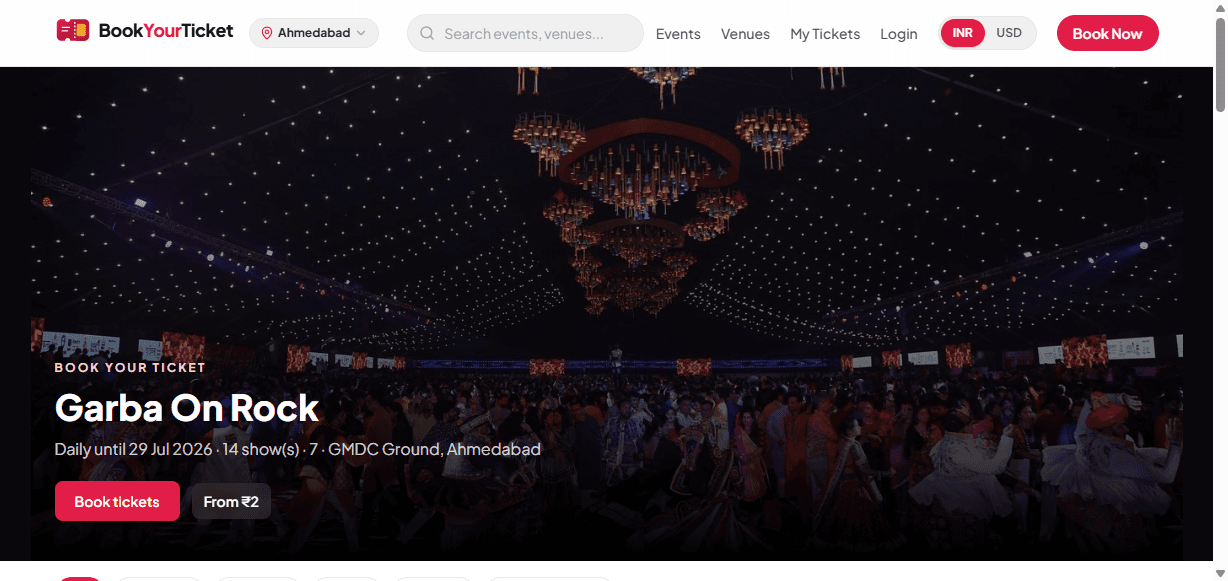
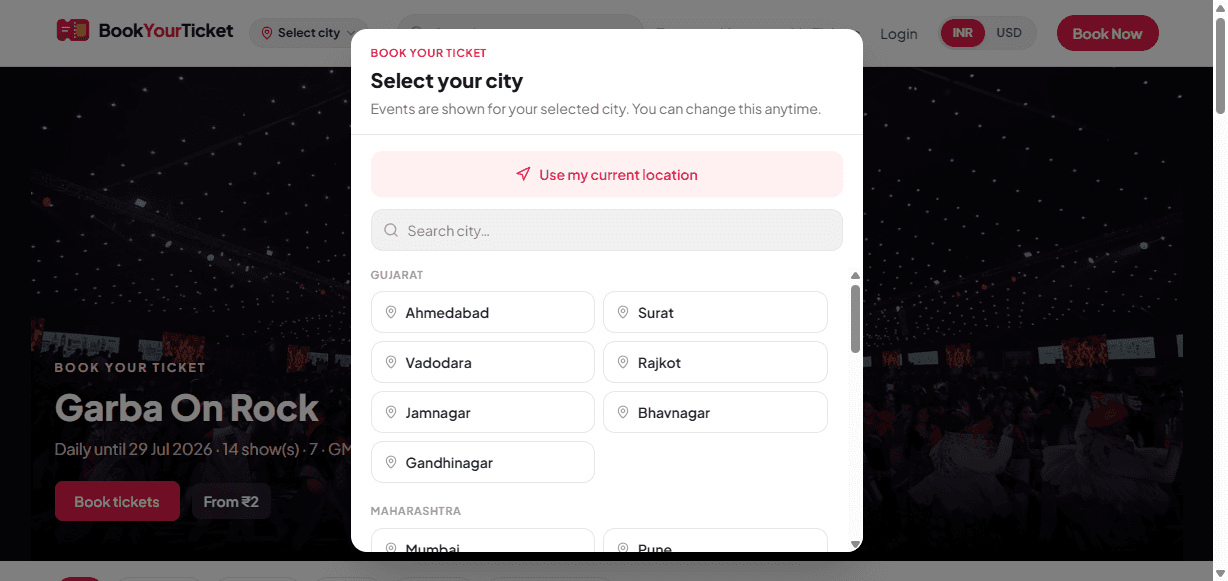
When a visitor opens Book Your Ticket, they choose a city (or use location). From that moment, home, events, and venues are scoped to that city — so a Surat buyer doesn’t drown in Mumbai listings.
The home experience uses a featured hero, trending rows, recommended picks, and category carousels so your show can appear in multiple discovery surfaces, not only a single search result.
A header INR/USD toggle helps NRI and tourist audiences understand pricing before they click Book. Search works across events and venues from any page.
For organisers
- Higher local conversion — buyers see only relevant inventory
- Your event can sit in hero, trending, and category rows
- Share a single marketing URL; city context stays with the fan
Fan experience
- City picker + “use my location”
- Featured hero, trending & category carousels
- INR / USD display toggle
- Search events and venues anytime
02 · Listings
Organised catalogue: category, venue, price
Events stay easy to browse — Comedy, Concert, Festival, Garba, and custom categories — with venue chips and clear “from” pricing.
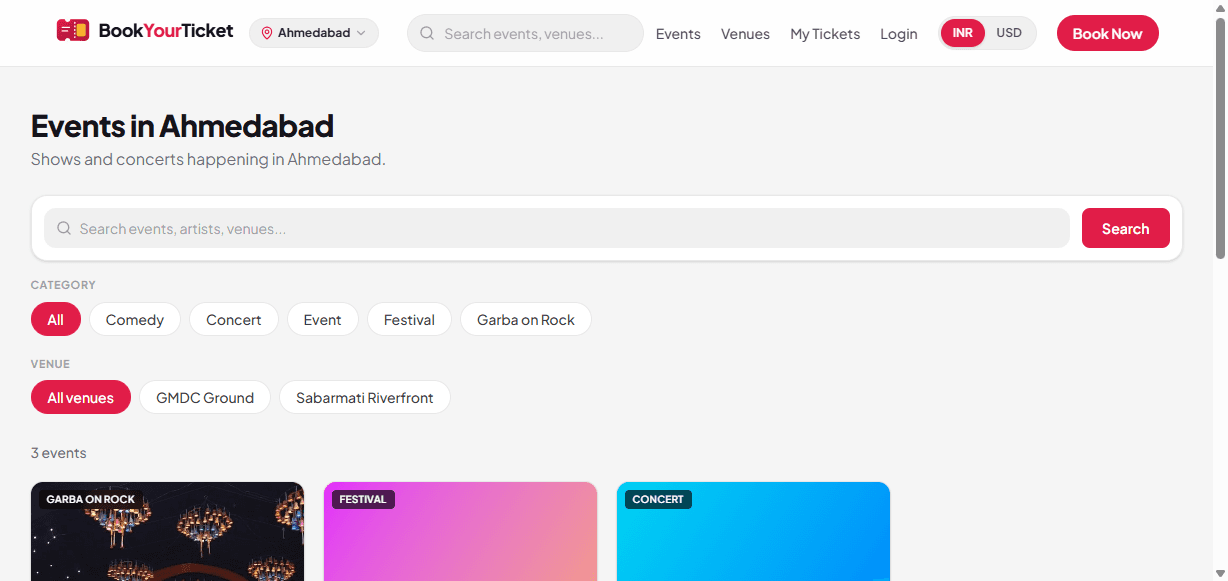
The public Events page combines text search with category chips and venue filters. Fans can jump from “all concerts” to “only GMDC Ground” in one tap.
Each card shows a clear starting price so buyers can compare without opening every detail page. One-night shows and multi-date / recurring shows both work in the same list.
Organisers manage categories from admin (Festival, Concert, Comedy, and more) so your brand taxonomy matches how you market the show.
For organisers
- Category taxonomy you control from admin
- Venue filters that push traffic to the right ground
- Supports single-date and multi-show / recurring calendars
Fan experience
- Search + category chips
- Venue filters (e.g. GMDC Ground)
- Clear “from” pricing on every card
- Works for one-night and multi-date shows
03 · Venues
Grounds that sell themselves
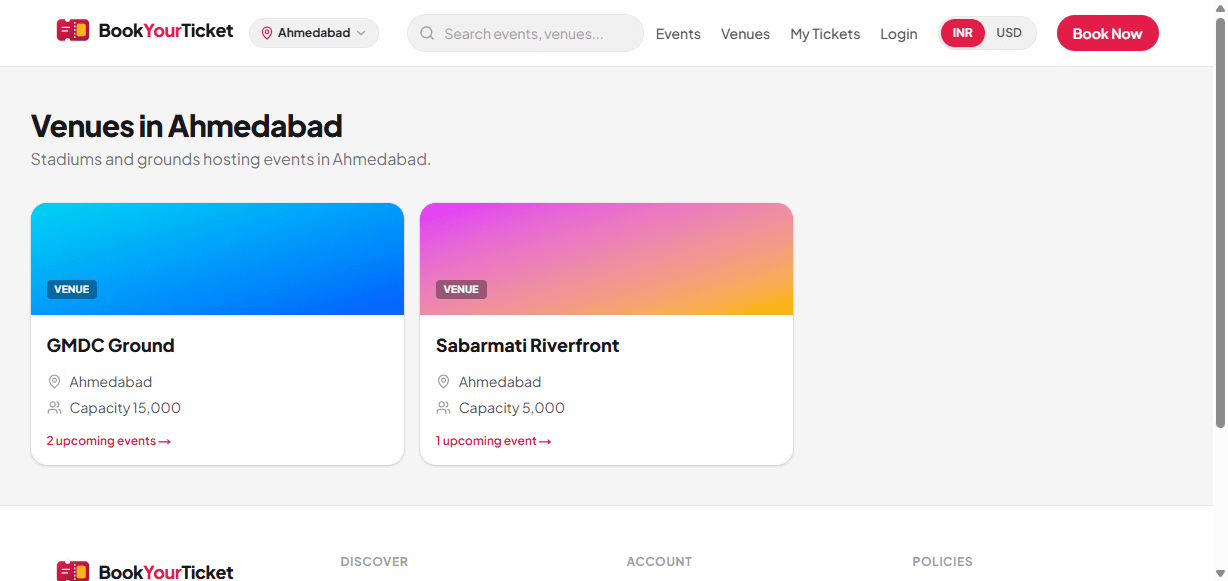
Public venue pages show capacity and upcoming events — useful for fans, sponsors, and co-promoters.
Venues are first-class objects: a public directory by city, capacity, and how many upcoming events are live. A fan researching “what’s on at Sabarmati Riverfront” lands on your shows automatically.
In admin you configure grounds, default seat templates, and open-ground designs that map zones to ticket categories. Event pages can link out to maps for wayfinding.
This reduces repeated “where is the venue?” support and gives sponsors a professional landing surface for the ground.
For organisers
- Reusable venue + seat / ground templates across shows
- Open-ground designs tied to ticket categories
- Maps-friendly event detail pages
Fan experience
- Venue directory by city
- Capacity + upcoming event count
- Easy jump from venue → events
- Maps context on the event page
04 · Booking
Seat map or open-ground qty — then pay
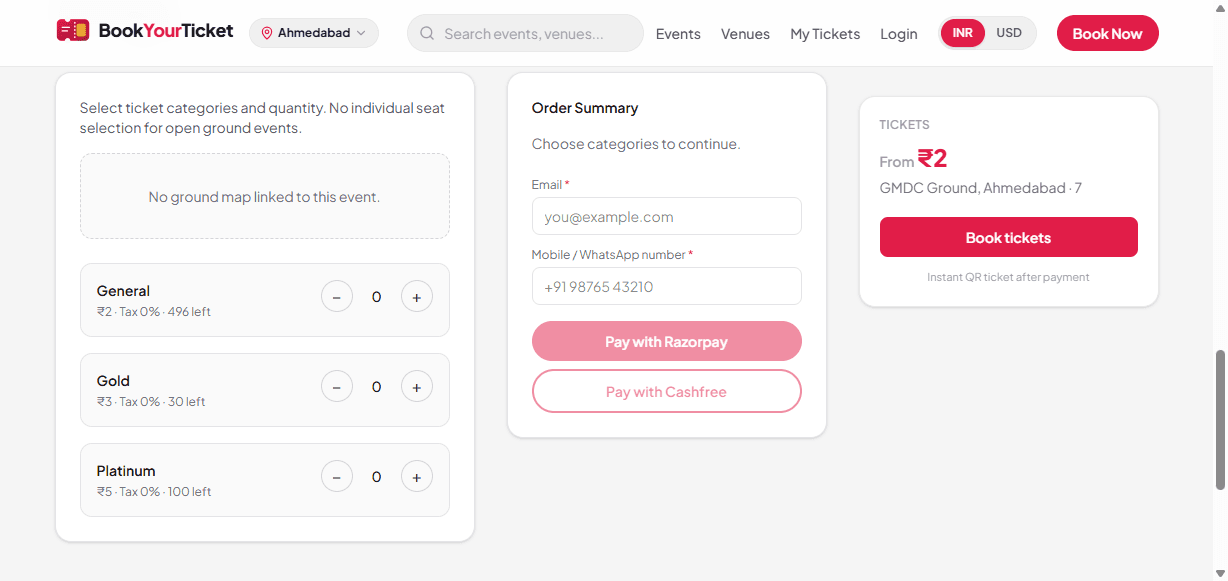
Two inventory models in one checkout: pick seats on a map, or pick category quantities for open grounds and festivals.
Seated events: fans select seats on a layout. Unavailable seats (sold or held) are blocked in real time so two buyers cannot claim the same seat.
Open-ground / festival events: fans choose categories (e.g. General, VIP, Early Bird) and quantities against remaining inventory — ideal for large outdoor shows without fixed chairs.
Checkout always collects email + WhatsApp mobile (required). Buyers must accept Terms, Refunds, and Privacy before paying — reducing later disputes.
While payment is in progress, seats / tickets are held for a limited window (about 10 minutes) with an on-screen countdown so inventory is not locked forever if someone abandons checkout.
For organisers
- One product for theaters and open grounds
- VIP / Gold / Family / Early Bird as priced categories or seat tiers
- Tax % + platform fee per ticket configurable per event
- Seat holds protect inventory during payment
- Policy acceptance baked into checkout
Fan experience
- Seat map or category + quantity
- Transparent tax & fee breakdown
- Hold countdown during payment
- Recurring date / multi-show picker when needed
05 · Payments
Razorpay · Cashfree · PayPal
Local UPI/card rails for India and PayPal for international / NRI buyers — all wired into the same booking confirmation flow.
INR checkout uses Razorpay and/or Cashfree so fans can pay with UPI, cards, and other local methods your gateway enables. The booking only confirms after server-side payment verification (and gateway webhooks for reliability).
PayPal covers USD-oriented buyers. Display currency can show approximate USD while Indian gateways still settle in INR where configured.
Failed or abandoned payments release holds so inventory returns to sale. Successful payment creates the booking, triggers ticket delivery, and shows an on-page confirmation with booking ID.
For organisers
- Don’t lose sales to “we only take one gateway”
- Server verification + webhooks reduce fake “paid” claims
- Amount tracking in INR for settlements and reporting
Fan experience
- Familiar Indian payment UX (Razorpay / Cashfree)
- PayPal when USD / international is preferred
- Instant confirmation screen with booking ID
- Same ticket delivery path regardless of gateway
06 · Ticket delivery
WhatsApp + email the moment they pay
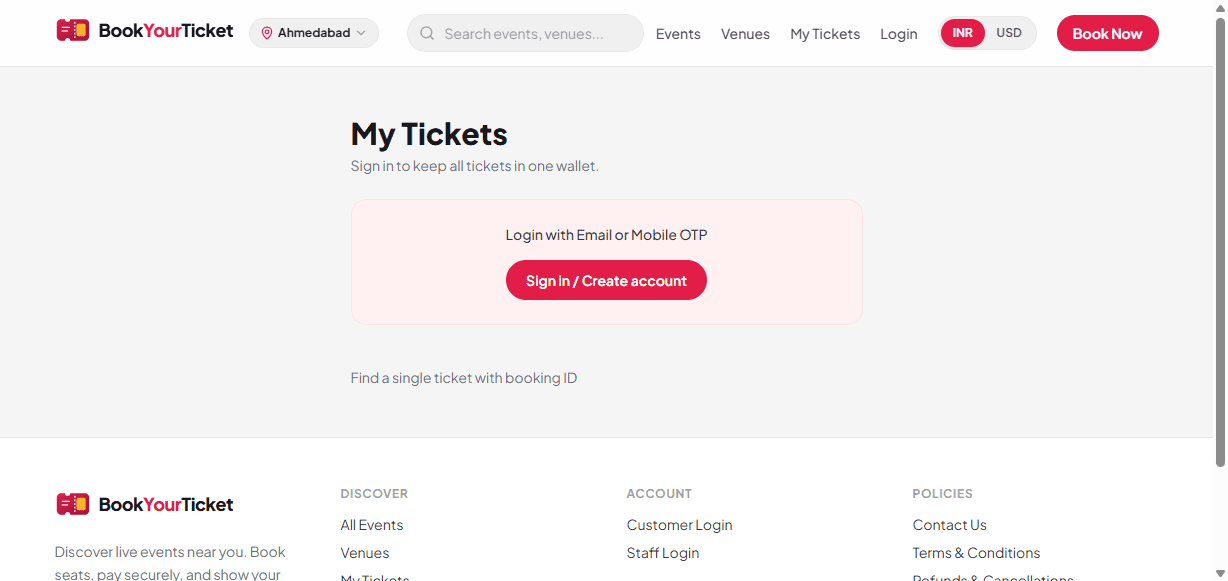
Confirmed bookings send a QR ticket on WhatsApp and email. Fans can also open My Tickets, download PDF, and request a resend.
After payment verification, the platform generates a unique QR token per booking and delivers it through configured channels: SMTP email and OpenWA WhatsApp.
Email includes the ticket details fans need at the gate. WhatsApp reaches the mobile number collected at checkout — critical in India where email is often secondary.
From My Tickets (signed-in wallet or guest booking-ID lookup), fans can show the in-app QR, download a ticket PDF, download a tax/payment invoice PDF, and resend the ticket if the first message was missed.
Signed-in customers can also submit a ticket transfer request (new recipient email/phone) for your team to process — useful for corporate blocks and last-minute guest changes.
For organisers
- Fewer support tickets on show day
- Resend from admin or customer self-serve
- Invoice PDF for accounts / reimbursement
- Transfer requests logged for staff follow-up
Fan experience
- WhatsApp + email delivery
- In-app QR + ticket PDF
- Invoice download
- Guest lookup by booking ID still works
07 · Customer accounts
Passwordless OTP — email or WhatsApp
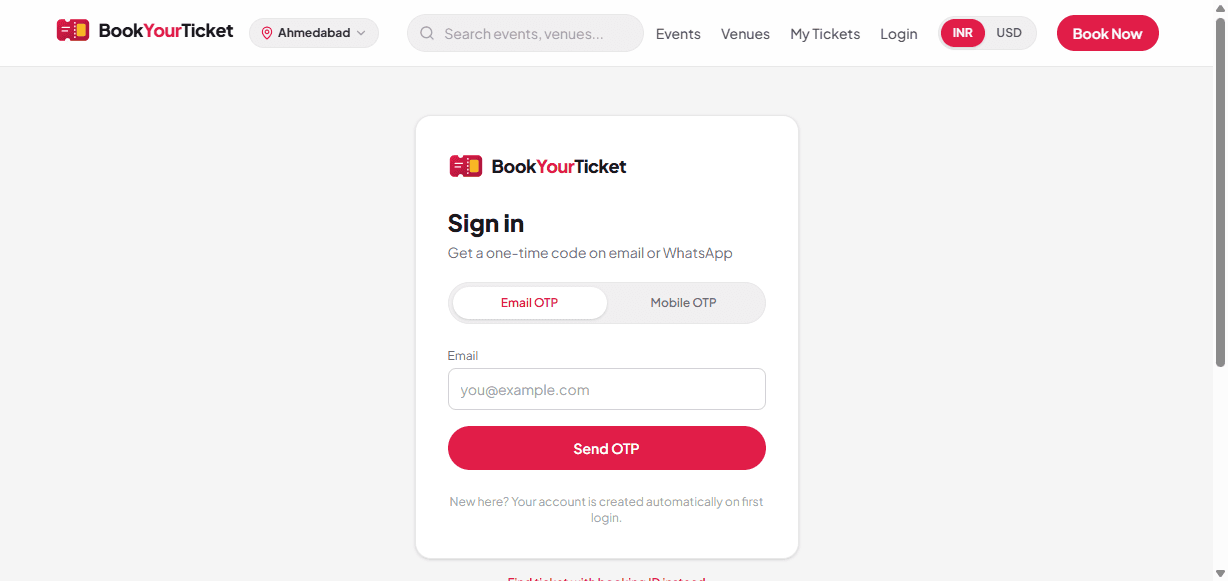
No password friction. One-time codes create accounts automatically and keep the ticket wallet secure.
Customers choose Email OTP or Mobile / WhatsApp OTP. On first successful verify, an account is created automatically — no separate “register” step.
Signed-in users see all bookings matched to their email/phone in one wallet. Profile changes to email or mobile require a fresh OTP so accounts stay hard to hijack.
Guests who never sign in can still retrieve a single booking with booking ID + email — so you don’t force every buyer through account creation.
For organisers
- Higher login completion vs password forms
- Verified contact channels for marketing & support
- Guest path still available for one-off buyers
Fan experience
- Email OTP or Mobile / WhatsApp OTP
- Auto account creation
- OTP re-verify when changing contact details
- Guest booking-ID lookup
08 · Gate & scan
Phone QR scan with fraud controls
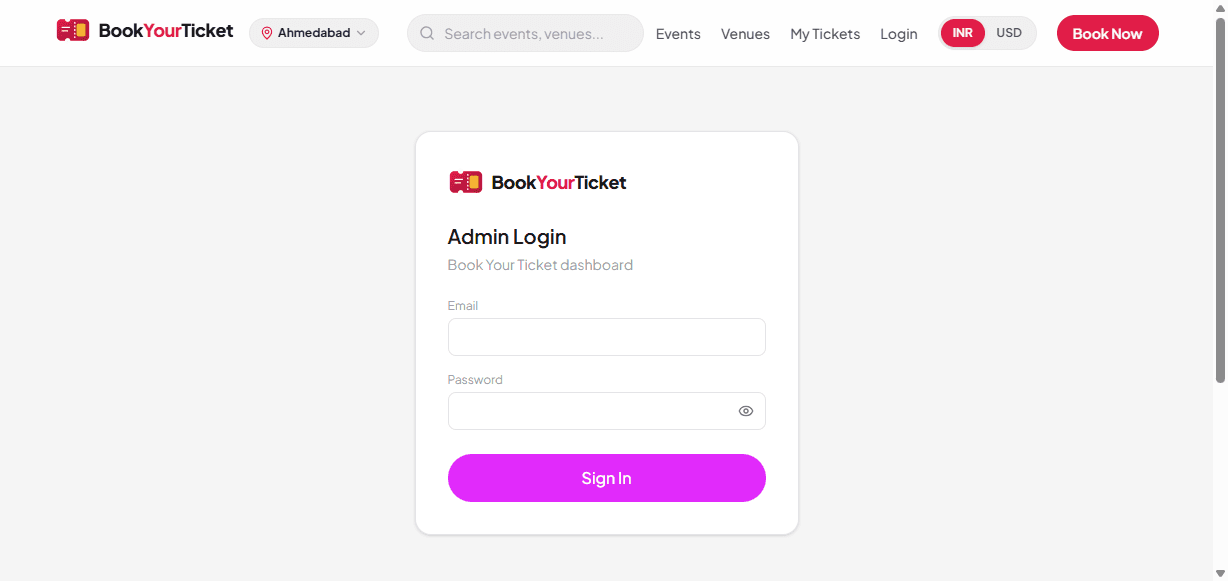
Gate staff scan on a phone browser. The system blocks already-used, cancelled, or wrong-event tickets and keeps an audit trail.
Staff open the Scan Gate tool on a mobile device (no special hardware required beyond a camera phone). Each successful scan marks the booking checked-in.
Invalid scans are rejected with clear reasons — already checked in, cancelled, or not matching the event — so queues don’t stall while managers guess.
Scan Logs in admin give you a dispute trail: who was scanned, when, and with what result. Ideal for VIP disputes and sponsor audits.
For organisers
- Low hardware cost — use existing phones
- Duplicate entry protection
- Audit logs for every scan attempt
Fan experience
- Show QR from WhatsApp, email, PDF, or My Tickets
- Fast entry once the QR is valid
- Clear failure if the ticket is already used
09 · Admin & ops
Run the show from one dashboard
Staff login opens Events, Categories, Grounds, Bookings, Waitlist, Contact inbox, Scan logs, Settings, and Staff — with role-based access.
Event tools: create / edit / archive, posters, recurrence, tax & platform fees, ticket categories or seat layouts, and CSV bulk import for large catalogues.
Ops tools: search bookings, cancel with gateway refund attempt, resend tickets, review sold-out waitlist sign-ups, and read Contact Us form messages in one inbox.
People tools: assign roles (super admin, organiser, manager, gate staff) and scope staff to specific events so gate teams don’t see the whole business.
Platform settings (super admin): keep INR↔USD display rates current for PayPal-facing audiences.
For organisers
- One back office instead of spreadsheets + chat
- Cancel → refund path reduces manual settlement work
- Waitlist recovers demand when seats reopen
- Contact messages stay in-product, not only in email
Fan experience
- Faster support when your team has the full booking record
- Resent tickets when messages are lost
- Fair waitlist notifications on sold-out shows
10 · Waitlist & refunds
Sold-out recovery and cancellation refunds
When a show sells out, fans can join a waitlist. When you cancel a booking, the platform can attempt a payment-gateway refund.
Waitlist: on sold-out inventory, interested fans leave email/phone. When cancellations free seats, your team can work the waitlist instead of losing that demand to competitors.
Refunds: admin cancel can request a refund through Razorpay, Cashfree, or PayPal based on how the order was paid. Refund status is stored on the order for finance follow-up.
Public Refunds & Cancellations and Terms pages set expectations before purchase (checkout requires policy acceptance).
For organisers
- Capture demand even when sold out
- Gateway refunds reduce manual bank transfers
- Clear public policy pages for compliance conversations
Fan experience
- Join waitlist when the show is full
- Published refunds & cancellations policy
- Contact form for booking / payment help
11 · Multi-city growth
Launch city by city without rebuilding
Start with one city, then expand. Fans always browse the city they chose — perfect for touring festivals and state circuits.
The catalogue is multi-city from day one. You can soft-launch in Ahmedabad, then open Surat or Mumbai when inventory and venues are ready — without a new app.
Fans change city anytime from the header. Marketing can still share one root domain; local relevance happens after city selection.
Combined with venue pages and category filters, touring festivals can publish whole circuits under one brand.
For organisers
- Phased city rollout
- Touring / multi-city festival support
- One marketing domain for all cities
Fan experience
- Pick city once, change anytime
- Only see relevant local inventory
- Same familiar booking flow in every city
12 · Trust & support
Policies, contact, privacy, and guides
Launch-ready trust surfaces: Privacy, Terms, Refunds, FAQ, Contact form, User Guide, cookie notice, and SEO basics.
Buyers see Privacy, Terms, Refunds, FAQ, and Contact before and after purchase. The Contact form stores messages for your admin inbox and emails your enquiry mailbox.
A short User Guide walks fans through city → browse → OTP → book → My Tickets. Cookie notice covers essential preferences (city, currency, sign-in).
Account holders can export their data or close their account (DPDP-oriented self-serve). Site metadata, sitemap, robots, and event structured data help Google discover your shows.
For organisers
- Professional trust pages for sponsors & venues
- Central contact inbox + email alerts
- SEO foundations for organic discovery
Fan experience
- Clear policies before paying
- User Guide + Contact Us
- Data export / account close from Settings
13 · Customer data
Know who bought — email, WhatsApp, history
Customer data is collected at checkout and linked to bookings, so support, gate disputes, and remessaging don’t depend on random WhatsApp forwards.
At booking, every buyer must enter email and WhatsApp/mobile. Paid orders store those contacts with seats, amount, payment provider, and show date — searchable from the Bookings admin.
Passwordless OTP login creates a customer account and ticket wallet. Bookings matched to the same email/phone appear in one place (My Tickets), so returning fans don’t hunt for old PDFs.
Delivery channels (email + WhatsApp) and optional profile updates (OTP-verified) keep contact quality high. Guests can still look up a single booking by booking ID without a full account.
Contact Us form messages land in your admin inbox and enquiry email. Account holders can export their data or close their account — useful when venues ask about privacy readiness.
Organisers use this layer for: resend ticket, invoice PDF, transfer requests, refund/cancel lookups, and personal replies — without maintaining a separate CRM spreadsheet for every show.
For organisers
- Verified email + WhatsApp on every paid order
- Search bookings by customer email / booking ID
- Resend, invoice, transfer, and refund from real order data
- Contact inbox for website enquiries
- Privacy-friendly export / account-close path for buyers
Fan experience
- Tickets tied to the email/phone used at checkout
- Signed-in wallet for all past shows
- Guest booking-ID lookup still available
- Download ticket + invoice when needed
14 · Customer offers
Design offers that match how you sell
Use ticket categories and seat tiers as your offer engine — Early Bird, combo nights, sponsor codes as named packages, and limited inventory per offer.
Offers on Book Your Ticket are configured as priced inventory: open-ground categories or seated tiers. Name them the way you market — Early Bird, Super Early Bird, Couple Pass, Day Pass, Add-on, Sponsor Guest — each with its own price and remaining quantity (or seat rows).
Limited-quantity Early Bird sells urgency: when that category sells out, fans move to the next tier. Recurring / multi-date events can reuse the same offer structure across show nights.
Tax % and platform fee stay transparent in the breakdown, so “offer price” still looks professional at checkout. Display currency (INR/USD) helps NRI buyers compare packages.
After purchase, offer buyers get the same WhatsApp + email QR path — your marketing promise ends in a real ticket, not a voucher screenshot in a chat group.
Sold-out demand can still be captured on the waitlist so your next Early Bird drop or extra show has a warm list of interested contacts.
For organisers
- Early Bird / phased pricing as separate categories
- Limited inventory per offer (natural scarcity)
- Same admin tools for every offer type
- Waitlist to catch fans who missed the offer window
- Clear pricing + tax so finance stays clean
Fan experience
- See offer names and prices before paying
- Pick quantity per offer/category
- Pay with familiar gateways
- Instant QR after successful payment
15 · VIP & Family
VIP customers, Family packs & group packages
Reach premium and family audiences with dedicated packages — VIP rows, Family packs, corporate blocks — without a separate booking system.
VIP customers: create VIP / Gold / Lounge tiers with their own seat rows or ground zones and premium prices. Gate scan still uses one QR flow, while scan logs help resolve VIP entry disputes.
Family offers: publish a Family Pack / Couple / Kids category (fixed price for a set quantity) or instruct buyers to add multiple tickets under General + Child categories. Open-ground qty mode is ideal for family festivals and garba nights.
Group & corporate: sell a Group / Corporate category in bulk, or fulfil name changes later via ticket transfer requests from the customer account — useful when companies book seats first and assign guests later.
Hospitality storytelling stays on the event page (poster, venue, categories). Your sales team can point sponsors to VIP inventory and family-friendly packs on the same public booking link.
Because every package still collects email + WhatsApp, you can remessage VIP and Family buyers for the next season show — your customer data and offers work together.
For organisers
- VIP / Gold / Lounge tiers with distinct pricing & seats
- Family Pack / Couple / Kids as named categories
- Group & corporate bulk categories
- Transfer requests for late guest name changes
- Gate audit suitable for VIP entry disputes
Fan experience
- Clear VIP vs General vs Family choices
- Buy the right pack in one checkout
- QR works the same at the gate for every package
- Signed-in fans keep all packages in My Tickets
Admin toolkit (your team)
After staff login, organisers get a full back office. Roles control who can manage events, finance-sensitive actions, or only gate scanning.
Events & catalogue
Create / edit / archive, posters, recurrence, pricing, tax & fees, CSV import, categories.
Venues & maps
Grounds, seat templates, open-ground designs mapped to ticket categories.
Bookings, refunds & waitlist
Search orders, cancel with gateway refund, resend tickets, recover sold-out demand.
Staff, gate & inbox
Roles & event assignments, mobile QR scan, scan logs, Contact Us message inbox.
Ready to list your event?
For venue onboarding, partnership, or settlement questions, email us with subject “Business enquiry” — Book Your Ticket inquiries go to directoratulpatoliya@gmail.com.
Marketing link to copy: https://ticket.carbitec.co/catalog